Cool Gaming Room Ideas to Completely Upgrade Your Vibe
If you ever scroll through different social media platforms and see these extravagant, visually appealing setups and think that you either don't have the budget or creative power to do this with your own setup, you are not alone. What if I told you that creating a beautiful, visually appealing setup wasn't too far-fetched? If it's late-night gaming sessions or grinding out work, your desk is your productivity hub. You shouldn't and don't have to empty your bank account to make something, as you see online; it's much easier than it may seem. Here, I will show you cool gaming room ideas that will help you build a premium aesthetic gaming setup. It isn't about dropping a bag; it's about smart and affordable upgrades that can create the high-level desk environment you see from the pros.
Why an aesthetic gaming setup Actually Matters
Before we get into the cool gaming gear and tricks to upgrade your setup, let’s talk about why you should even care. It's easy for people to look at a clean, customized desk and think it's just for show, but that's far from the truth. According to research from the Association for Psychological Science, getting work done at a cluttered desk significantly drains your energy and makes you far less efficient, while having a clean and organized desk actively increases your presence and focus. Your desk environment plays a big role in your headspace and your mindset when at your desk. You want your desk to be customized to your needs to improve productivity and efficiency when working or gaming. Having an unorganized desk will slow you down and distract you from what it is you are trying to accomplish, whether that be winning a video game or getting a big project done.
Step 1: Lighting is Everything
If you're reading this, chances are you have seen YouTube channels like TechSource or other related gaming ones that show off elegant and well-designed setups. All the best setups have one main theme in common: amazing lighting. You can have a crapy folding table from a hardware store, and if you light it correctly, it will look like a professional setup.
You don't need expensive smart panels. Go grab a cheap roll of LED light strips from Amazon, like these 32.8 ft strips for $8.52: https://a.co/d/00FB8AhY.
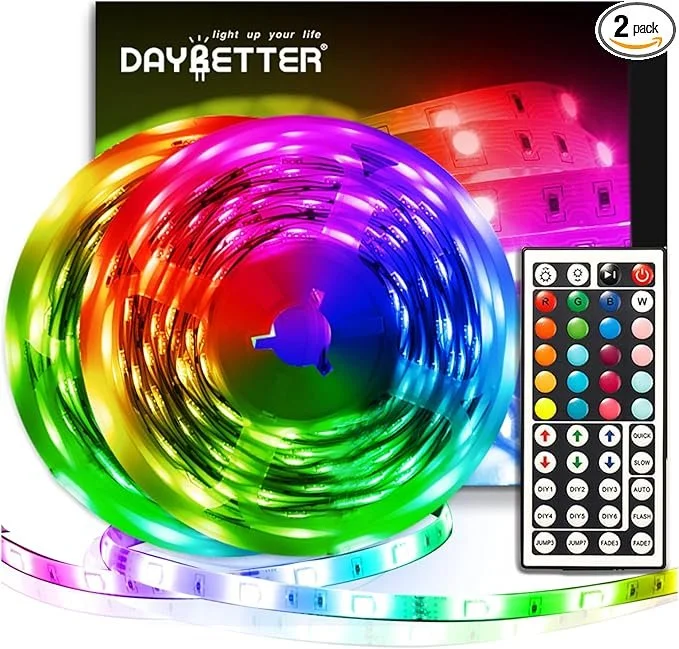
Run one strip along the back edge of your desk so it glows ambiently against the wall, and stick another strip to the back of your monitor to create a sick-looking lighting effect. This immediately creates a glowing halo effect that makes your whole setup pop and drastically reduces eye strain when you are gaming in the dark.
One mistake some setup enthusiasts might make is just turning on the lights and calling it a day. I always suggest picking a two-color theme for your setup that matches components in your setup, like your console/PC and/or things like your controller or keyboard.
Be sure not to overspend on lights, but better yet, spend your time on the placement of those lights to increase your vibe within your desk setup.
Step 2: Desk Space and look
Before you can think about upgrading your gear on your desk, you need to look at your desk surface and think to yourself, "Do I really need this?" Obviously, you will want to take out all the garbage and junk from your desk, and then after, you can think of things that will help brighten your setup's vibe.
One main thing each desk must have is a clean and sleek desk mat to take up the space of a blank wooden tabletop. There are many options in the market, but PureGlide Gaming has all the variety you may need, from blank colored mousepads to extravagant LED-lit gaming desk mats that completely upgrade your setup's vibe. Having a visually appealing desk mat is like a rug in a living room. It brings life to the area and helps to tie the whole space together with one simple product.
Buying a nice mousepad is not all about the looks, but it will drastically upgrade your experience in-game, ensuring you don't have to worry about your mouse sliding off your mat or your mouse getting caught on something in high-stakes game moments. Instead, you will experience a pure glide of your mouse across your desk while also increasing your setup's look.
Step 3: Cable Management
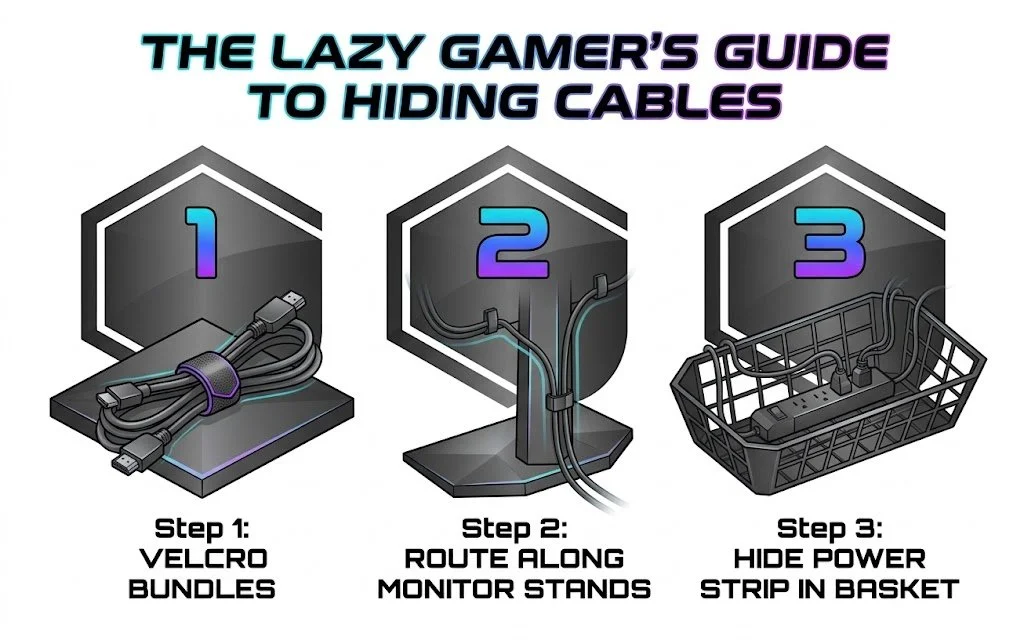
Okay, I hate doing this part just as much as you do, but we have to talk about those darn messy cables. The more tech you have, the more cables you have, and while the tech brings a great aesthetic to your setup, those cables can just as easily bring that aesthetic down. While it is tedious, cable management costs almost zero dollars to do, but it is the number one thing that separates a mediocre-looking desk from a premium one.
Listen, it's simple and easy; it just takes some time. Grab some tape, Velcro, or even rubber bands and try organizing your wires to their easy power source. Combine these wires into one wire and thread them behind your desk. Try to keep wires together that connect to your computer and keep wires together that connect to your monitor. If you do this correctly, you should only have a few sets of wires that you need to worry about hiding. Note that not all the wires can be hidden, but making the wires look like they are placed with a purpose makes all the difference.
Step 4: Make It Yours
Alright, we have hit all the essentials for a clean, personalized setup, but it might feel like something's missing...
A clean desk with RGB lights and clean cable management is awesome, but it can feel a little generic and just like any other setup you see. This is why I emphasize choosing a colorway for your setup, along with the finishing touch I will explain now: your own. You want to bring a personal vibe to the desk to really make it your own.
There are many different ways to add your own touch to really bring your setup to life. This could be something like a small fake plant, a small Lego set that matches your vibe, or what you may see on many setups around the internet: different Funko Pops. Wall art is also a way to easily keep up with your colorway and finish it off with a visually appealing picture or video game character. This isn't meant to clutter your desk, but adding just one personal piece can go a long way toward the overall look of your desk environment.
Thanks for reading! Follow us on our socials to see what's up next and look at our products to improve your desk!
